Help centre
Thank you! Your submission has been received!
Oops! Something went wrong while submitting the form.
How can I contact Smart Pension?
Got questions about your Smart Pension account? Here are the different ways you can contact us.
Member
How can I close a Smart Pension account?
To ensure a smooth process when closing a Smart Pension account, here’s what you need to do as an employer.
Employer
How are my contributions refunded when I opt out of the scheme?
Uncover how refunds work when you opt out of the scheme.
Member
How and when do you take employer contributions?
Find out how and when we take payment once you’ve uploaded your first contributions.
Employer
Help your employees by boosting their pension savings
Things to consider if you wish to make one-off contributions for your employees.
Employer
Employee next pay period date report
Review upcoming dates for employee contributions and identify any missed dates
Employer
Completing identity and verification
How to complete identity and verification through your Smart Pension account
Member
Combining your pensions before retirement
Make preparing for retirement easier by combining your pensions into one
Member
Change who receives emails from Smart Pension
Choose who receives emails and other notifications about your Smart Pension account
Employer
Can I pay pension contributions using a bank transfer?
How to apply to pay by bank transfer if you're unable to set up a Direct Debit mandate
Employer
Bereavement process
Learn what happens to a Smart Pension pension pot when a member dies before accessing their retirement savings.
Member
Automatic postponements
Learn how to set up an automatic postponement period for all new members of your scheme.
Employer
Add money at any time by making a one-off pension contribution
Boost your pension savings without committing to regular payments.
Member
Accessing your savings at retirement
Learn how to access your Smart Pension savings at retirement. Understand your options, how to start the process, and where to access help and guidance.
Member
About PAPDIS files
Learn more about PAPDIS files and the answers to some commonly asked questions.
Employer
No results found.
Try a different search term or browse the help topics below.
Viewing your clients
How to view the list of clients you or other users on your adviser account manage
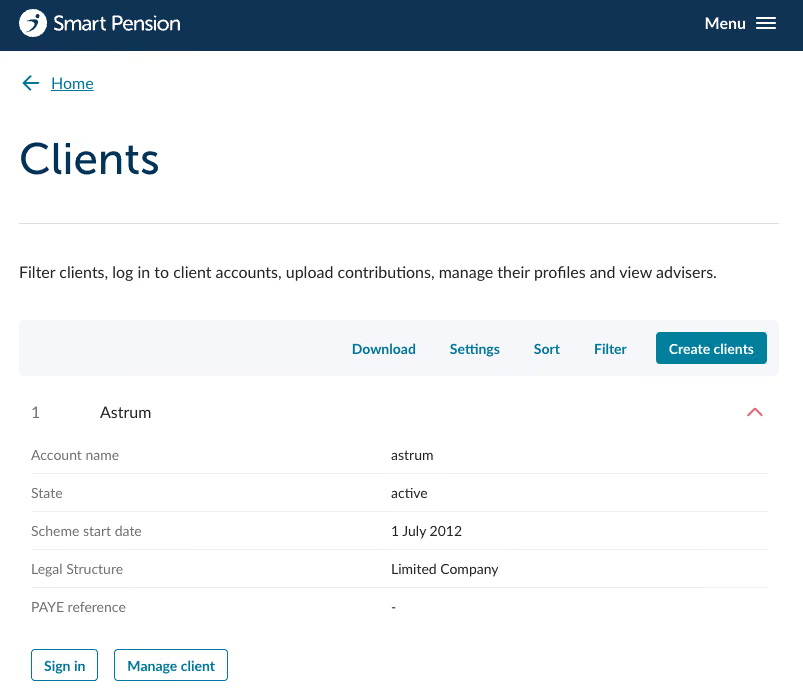
- To view your list of clients sign in to the home page and then click the Clients option, pictured below.
- From here you will see a full list of clients you and your team manage, pictured below.
- View more details on a client by clicking on the red expansion arrow to the right of the client name.
Customising the clients view
There are several options that allow you to customise the view of the clients list.
Settings
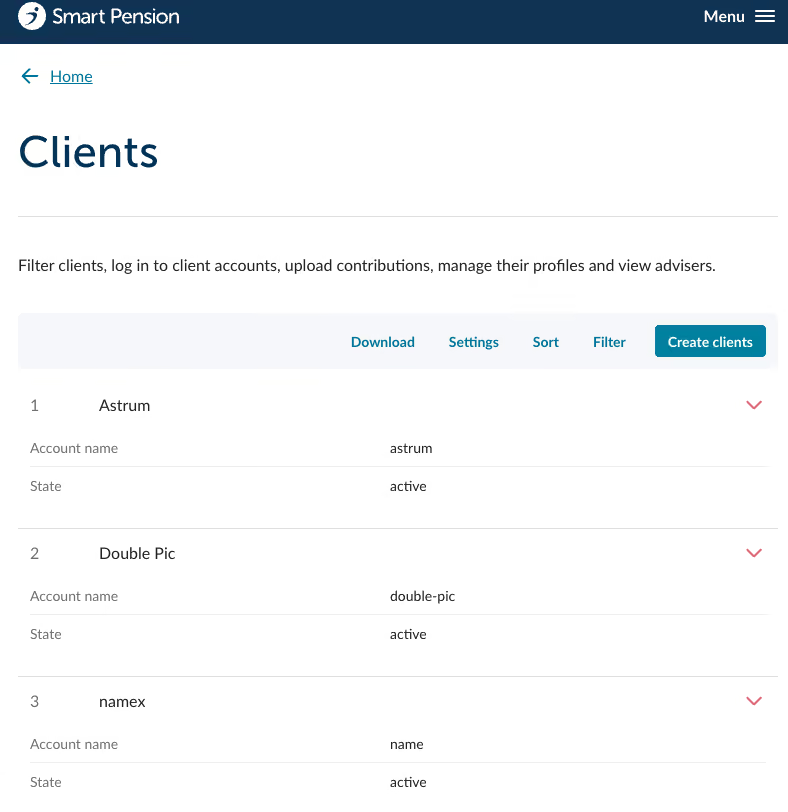
- The Settings button allows you to choose which details you want to be displayed at all times in the clients list. Click on Settings to choose from the available options.
- You can choose between Account name, State, Scheme start date, Legal Structure and PAYE reference as shown below.
- Click on Save and the selected options will be visible in the list.
Sort
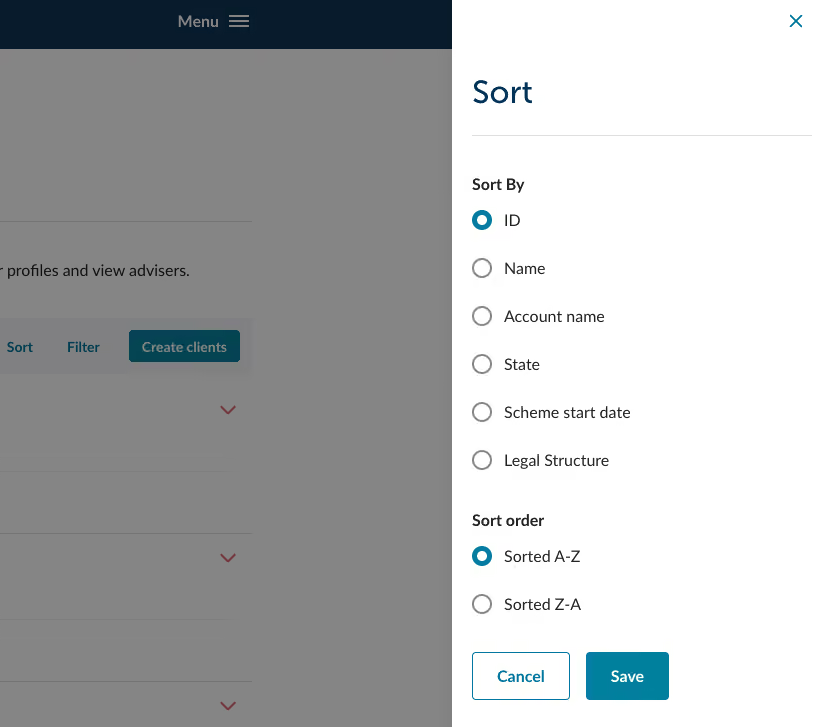
- You can use the Sort button in the menu bar to change the order you view your list of clients in. Click on the Sort button to see a list of options.
- Make your selections and click on Save.
Filters
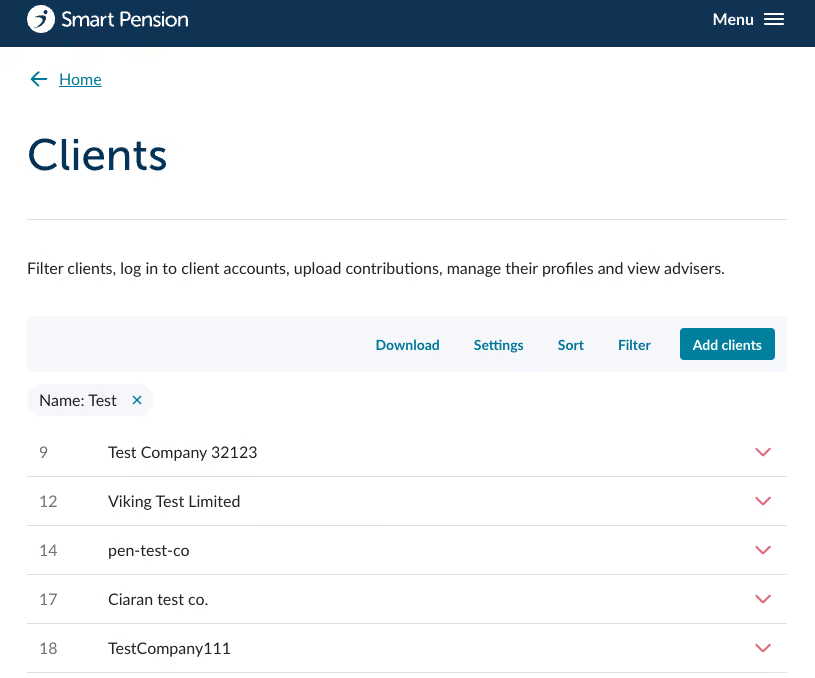
- Clients can be filtered by clicking on the Filter button in the menu bar at the top of the list.
- This then provides you with a list of filter options that you can select, and then refine further.
- Once you have applied the filters they will appear at the top of the clients list and can be easily turned off by clicking in the X in the top right of each filter description. In the example below the filter applied is "Name".
Last updated:
October 5, 2026