Help centre
Thank you! Your submission has been received!
Oops! Something went wrong while submitting the form.
What things should I consider before deciding to leave the scheme?
If you’re thinking of leaving Smart Pension, here are six things you need to be aware of and consider before making your decision.
Member
What is a Letter of Authority?
What you need to know about a Letter of Authority and how it allows advisers to act on your behalf.
Member
What assumptions are used for my pension statement?
Discover which assumptions are used for your Smart Pension statement.
Member
What do I do if my annual statement contains incorrect details?
If you’ve received your annual statement but have noticed incorrect information, here’s what to do.
Member
Transfer guide: One home for your pensions
Bringing your pensions together can make it easier to manage your pension savings.
Member
Smart Web Application Cookie Policy
Our web application uses cookies to distinguish you from other users. This helps us to provide you with a good experience when you use our web application and also allows us to improve it.
Your company to-do list
Before your pension scheme is ready to accept contributions, we need you to complete a few simple tasks in your to-do list.
Employer
Your account name
What your account name is, how to change it, and what to do if you've forgotten it.
Employer
Why was I automatically enrolled into a workplace pension?
Discover why you were automatically enrolled into a workplace pension and what to consider if you're thinking about opting out of the scheme.
Member
Why is your retirement age important?
Understand how your retirement age affects your pension and how to plan your retirement income with confidence and choice.
Member
Why has my PAPDIS file failed and how can I fix upload errors?
Discover what a PAPDIS error or a failed upload status means, and how to fix the problem with your PAPDIS file.
Employer
Where can I see contributions to my pension?
You can easily view pension contributions in your Smart Pension account. Here’s where to go.
Member
What is the pension calculator and how do I use it?
Frequently asked questions about the pension calculator
Member
What is the pay now feature and how does it work?
From where to find the feature to the purpose it serves, here are the answers to frequently asked questions about the ‘pay now’ feature within Smart Pension.
Employer
What is salary sacrifice and how does it work?
Explaining how salary sacrifice works, with examples
Employer
What is an expression of wish?
What you need to know about an expression of wish and how it impacts what happens to your Smart Pension savings if you die before retirement.
Member
What is an additional voluntary contribution?
This page explains what additional voluntary contributions (AVCs) are and what you can do if you have an AVC benefit.
Member
What is a P45 and how do I get one?
You generally receive a P45 when you leave a job, but here’s everything you need to know about the information on it and how to get one.
Member
What is a Letter of Authority?
A Letter of Authority allows advisers to act or ask for information on a member’s behalf, but here’s what else you need to know, including what should be mentioned in the letter.
Adviser
What happens to my Smart Pension savings if I leave my job?
Your pension savings are yours. If you’re leaving your job, your Smart Pension account can still be accessed but contributions will stop. Here’s what you need to know.
Member
What growth rate assumptions were applied to my savings in 2026?
Find out more about the growth rate assumptions used for your 2026 annual pension statement.
Member
What do the Smart Pension retirement options mean?
A breakdown of complicated and unfamiliar terms about retirement and the options available to you.
Member
What do I need to know about my annual pension statement?
Not sure how to view your pension statement or what it shows? Discover the answers to frequently asked questions about annual pension statements.
Member
What do I need to know about adding money or making regular pension contributions?
The most common questions asked about making one-off or regular pension contributions
Member
What do I do if I’ve forgotten my username or password?
Need to sign in to your Smart Pension account but forgotten your username/email address or your password? Here are the steps to follow.
Member
What do I do if I haven’t received my sign in details?
Discover how to access your Smart Pension account if you haven’t received your sign in details.
Member
What changes are being made to the normal minimum pension age?
The age you can start accessing your pension savings is changing from 55 to 57 on 6 April 2028, and here’s how it could affect you.
Member
What are the two HMRC approved methods for giving pension tax relief?
There are two HMRC approved methods for paying contributions into a Pension Scheme.
Employer
What are the Smart Pension PAPDIS assessment codes and specifications?
See our detailed PAPDIS specifications, what you can do with PAPDIS, and our assessment and event codes.
Employer
What are pensionable earnings?
When setting up your workplace pension scheme, you need to know which type of pensionable earning you want to go with. Find out what pensionable earnings are and the different types you can choose from.
Employer
What are means-tested benefits?
Learn all about means-tested benefits, key considerations regarding accessing your pension early and how taking money from your pension could affect them.
Member
Week 53 contributions
Learn about 'week 53' and check if you need to make contributions for this tax period.
Employer
Viewing your clients
How to view the list of clients you or other users on your adviser account manage
Adviser
Updating your staging date or duties start date
How to set up your pension scheme start date.
Employer
Updating multiple employees and contribution percentage
Within this tool you can add employees to groups or update contribution percentages.
Employer
Updating and managing signatories and admins
Tips on Managing your company's admins and signatories
Employer
Under what circumstances can I take my pension savings early?
There are a few circumstances in which you can access your pension savings before age 55
Member
Smart Pension and Moneysoft (Payroll manager)
How to set up your Smart Pension account with Moneysoft
Employer
Signing the participation agreement
Learn how to digitally sign the agreement between your company and Smart Pension.
Employer
Sending an adviser invitation
Learn how to send an invitation to an adviser so they can access your company pension scheme
Employer
Risk warnings
Highlighting the risks that come with saving for your future and providing you with the right information and support when you need it
Member
Personalising Smart Pension for your employees
How to add a company logo to your Smart Pension account
Employer
Pension investments are more volatile than usual
An update about your pension investments and current market conditions
Member
Pension contribution timelines and the investment process
This article explains how long it takes for your employees' pension contributions to clear and be invested, why you can only process one payment run at a time, and provides tips to help you manage your submissions smoothly.
Employer
Pay period data submission requirements
Understanding what pay period data needs to be submitted to the pension provider
Employer
Our top frequently asked questions about paying contributions by bank transfer
Find answers to frequently asked questions about paying contributions by bank transfer
Employer
Managing your clients
How to administer clients you or other users on your adviser account manage
Adviser
Maintaining your Smart Pension employer account
Make the most of your Smart Pension employer account with key functionalities that keep your pension operations running smoothly, especially at tax year-end when reviewing your pension scheme.
Employer
If I don’t have a UK bank account, what payment solutions are available?
How to set up a payment solution if you don't have a UK bank account
Employer
I need to send a confirmation of compliance to The Pension Regulator
Outlines client late payments and confirmation of compliance
Adviser
I can't remember my employer account name
You need your employer account name to sign in to your Smart Pension account. Here's where you can find it
Member
How to make adjustments or refunds for payroll contributions
This guide outlines the steps to process adjustments and refunds for payroll contributions due to administrative errors.
Employer
How to complete your retirement application form
Learn how to complete your retirement application form, what information you'll need to provide, and the steps required before we can process your retirement claim.
Member
How pensions work and why they matter
Learn how workplace pensions work, why they matter, and how they can help you build income for retirement. This guide explains how pensions grow over time, the different ways you can access your savings, and the tools available to help you plan ahead.
Member
How much money will I need when I retire?
Find out how much you may need for retirement. Use our retirement calculator to understand retirement living costs and how to boost your pension savings.
Member
How do member letters and communications work?
Discover how to access important letters and communications about your pension or account.
Member
How do I view and edit employee contribution information?
Keep your employee contribution records accurate and up to date. Follow the steps below to view and edit contribution information.
Employer
How do I use the assessment tool to calculate contributions?
See how you can use our assessment tool to assess your employees and calculate their contributions in one go.
Employer
How do I use a PAPDIS file to upload pre-assessed pension contributions?
How to use a PAPDIS file to process your contributions
Employer
How do I update employee details?
Discover how to update employee details including email, home address and more within your Smart Pension account.
Employer
How do I transfer my pension from another provider to Smart Pension?
Bringing pension pots together can make it easier for you to track your retirement goals and manage your pension savings. And you can do it with ease in your Smart Pension account.
Member
How do I sign in to Smart Rewards?
Find out how to access and make the most of Smart Rewards, a benefit provided to members of Smart Pension.
Member
How do I sign in to my member account?
Whether you're signing in for the first time or need help accessing your Smart Pension account, follow the steps below to sign in to your member account.
Member
How do I sign in to my employer account?
The steps you need to follow to successfully sign in to your Smart Pension employer account.
Employer
How do I rejoin or opt in to a Smart Pension scheme?
Discover the steps involved to rejoining or opting in to the Smart Pension scheme.
Member
How do I re-enrol employees back into my pension scheme?
It is your legal duty to check if you should put eligible employees who have left your pension scheme back into it. This is known as re-enrolment, and should be done every three years. Here are the steps to follow.
Employer
How do I pay my Smart Rewards savings into my Smart Pension account?
Pay your Smart Rewards savings into your Smart Pension account
Member
How do I find my old pensions?
It’s quick and easy to find out whether you have any lost pension treasure using our pension finder tool.
Member
How do I do a bonus exchange for my employees?
Uncover the benefit of a bonus exchange and how to make a bonus exchange payment to Smart Pension.
Employer
How do I change how much I pay into my pension?
Want to increase or decrease the amount you contribute into your pension? Here’s how you can adjust how much you’re putting in and how you can make a one-off payment.
Member
How do I access Pension Wise guidance?
Find out what Pension Wise guidance is, how it can help you before you take money from your pension savings, and how to book a free Pension Wise appointment.
Member
No results found.
Try a different search term or browse the help topics below.
Viewing your clients
How to view the list of clients you or other users on your adviser account manage
- To view your list of clients sign in to the home page and then click the Clients option, pictured below.
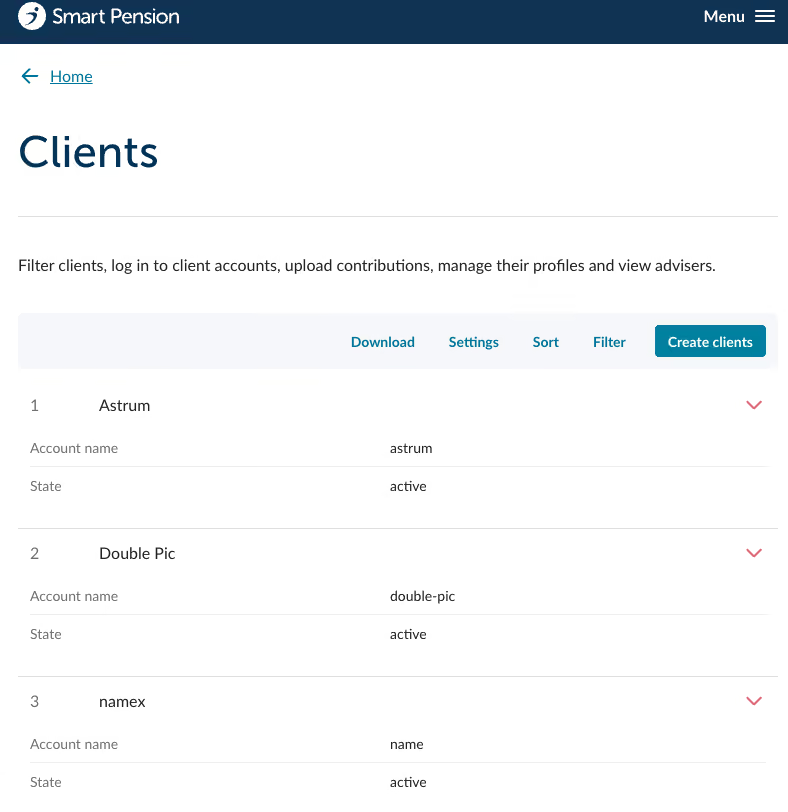
- From here you will see a full list of clients you and your team manage, pictured below.
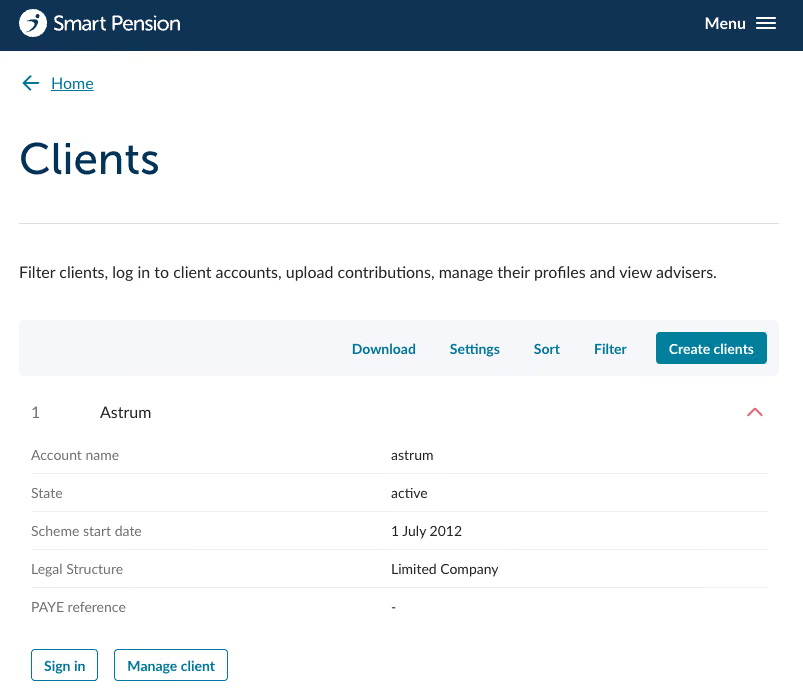
- View more details on a client by clicking on the red expansion arrow to the right of the client name.
Customising the clients view
There are several options that allow you to customise the view of the clients list.
Settings
- The Settings button allows you to choose which details you want to be displayed at all times in the clients list. Click on Settings to choose from the available options.
- You can choose between Account name, State, Scheme start date, Legal Structure and PAYE reference as shown below.
- Click on Save and the selected options will be visible in the list.
Sort
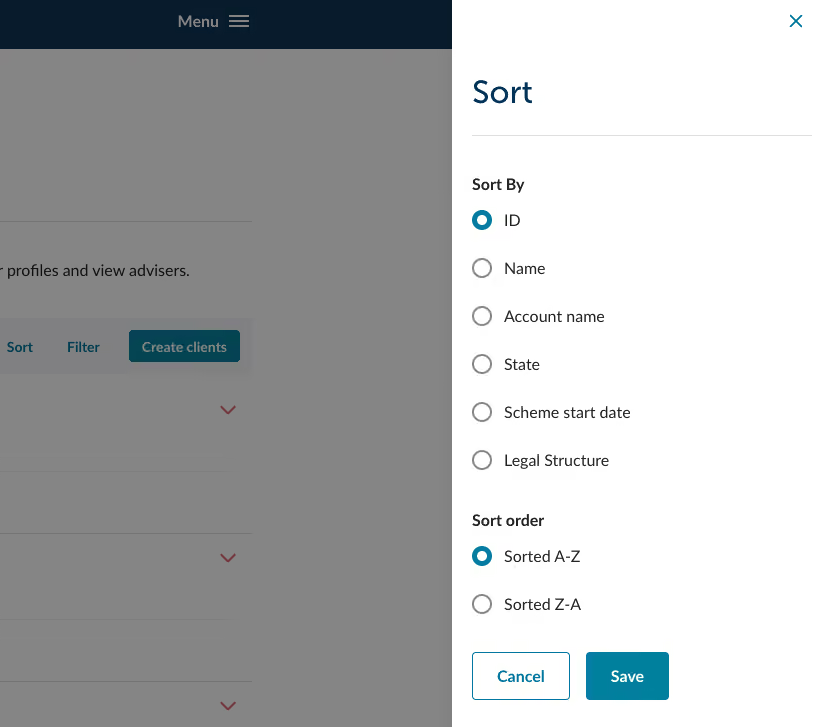
- You can use the Sort button in the menu bar to change the order you view your list of clients in. Click on the Sort button to see a list of options.
- Make your selections and click on Save.
Filters
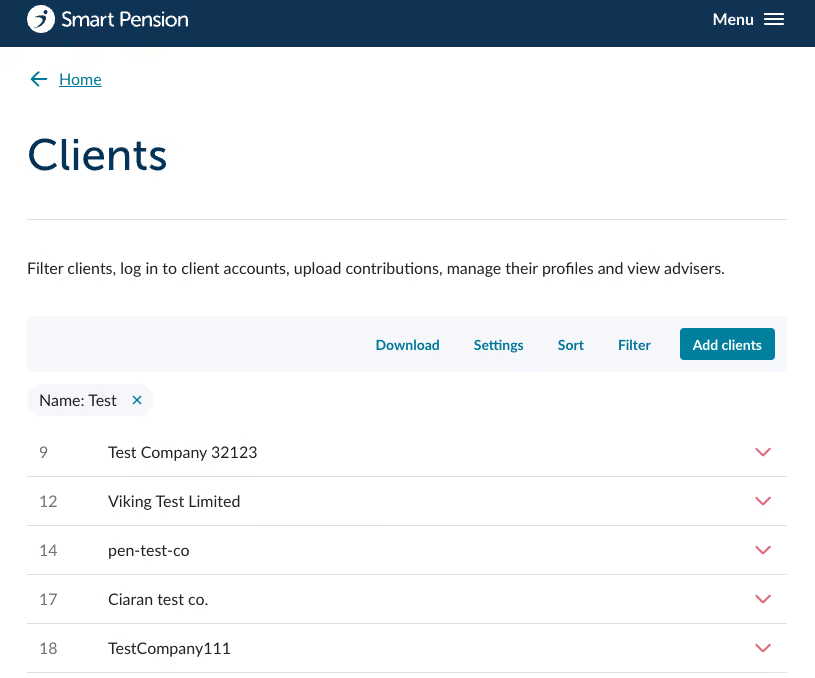
- Clients can be filtered by clicking on the Filter button in the menu bar at the top of the list.
- This then provides you with a list of filter options that you can select, and then refine further.
- Once you have applied the filters they will appear at the top of the clients list and can be easily turned off by clicking in the X in the top right of each filter description. In the example below the filter applied is "Name".
Last updated:
October 5, 2026