No results found.
Try a different search term or browse the help topics below.
Five steps to re-enrolment
Here are five steps you should follow to seamlessly re-enrol employees back onto Smart Pension:
- Choose a re-enrolment date
- Work out who to re-assess
- Re-enrol your relevant eligible employees
- Tell your employees you have re-enrolled them
- Tell The Pensions Regulator
1. Choose a re-enrolment date
Your first re-enrolment date is three years after your original staging date, but you have the flexibility to set it at any day three months before or three months after this.
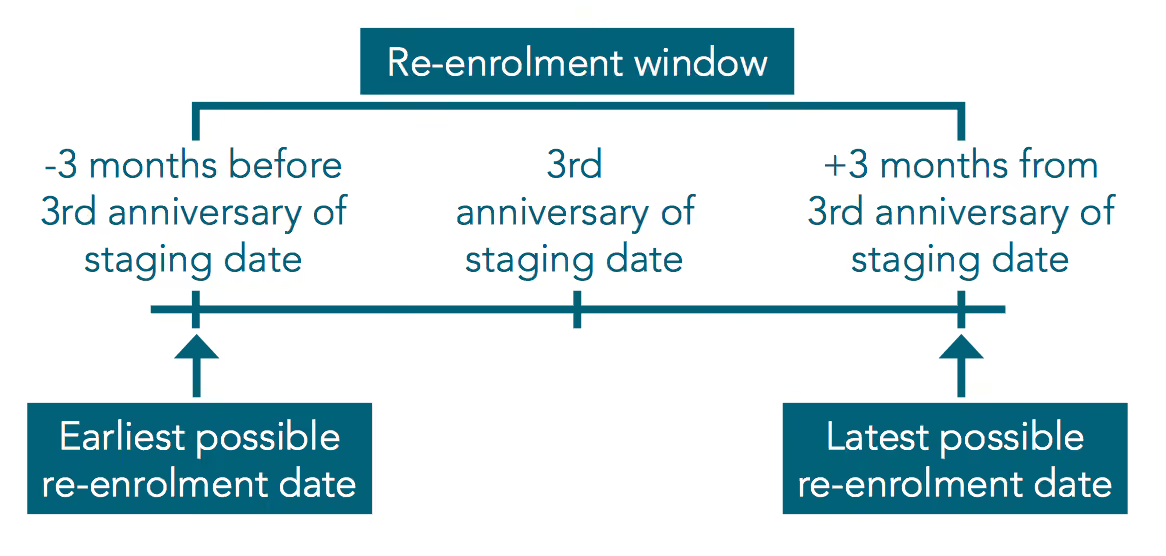
Any eligible employees are put back on to your pension scheme on the re-enrolment date. From that date, you have six weeks to write to your re-enrolled employees.
It's a good idea to choose a re-enrolment date that aligns with your payroll, so it matches the start of your pay period. If you run more than one payroll, you might want to select a date where your payrolls align, as you can only have one re-enrolment date.
Your next re-enrolment date will be three years after your last re-enrolment date. Again, you can choose to set this any day three months before or three months after this date.
Watch The Pension Regulator's short video introducing re-enrolment.
2. Work out who to re-assess
Who you need to re-assess
By law, you have to assess employees who opted out or ceased membership more than 12 months before your re-enrolment date.
Who you can choose to re-assess
You can choose to re-assess employees who opted out or ceased membership within 12 months of the re-enrolment date, but you are not obliged to do so.
You can also re-assess employees who have handed in their notice or have been given notice of dismissal, but there is no legal requirement to do this. If employees who have resigned decide to stay in your employment, you will need to include them in the assessment.
See more information on The Pensions Regulator's website.
3. Re-enrol your employees
How you re-enrol employees on Smart Pension usually depends on how you submit contributions.
If you upload a file to submit contributions:
- Sign in to your Smart Pension account
- Select the dropdown menu in the top-right hand corner, then Contribution and Payroll
- Select Calculate Contributions, then Upload contribution file
- Download a new template
This template will contain the records for employees due for re-enrolment. Follow your normal process for calculating contributions. When you next upload your contributions file we’ll re-enrol any eligible employees.
If you manually enter contributions:
- Sign in to your Smart Pension account
- Select the dropdown menu in the top-right hand corner, then Contribution and Payroll
- Select Re-assess employees to see a list of employees that need to be re-assessed
- To reassess an employee, select the clipboard icon next to the employee record
- Enter the re-enrolment period dates and gross earnings for the employee
- Click Create to finish re-assessing the employee
We'll also prompt you to re-enrol employees in your Smart Pension account's to-do list.
If you use PAPDIS or an API to submit contributions:
When your contributions are submitted to us via PAPDIS or API, we will add any employees eligible for re-enrolment back into the scheme.
We recommend you check with your payroll software provider if you are unsure about the process.
4. Tell your employees you have re-enrolled them
We will send your re-enrolled employees a confirmation email if we have their email address. If we don't, we'll generate a re-enrolment letter for you to give to them.
You must give them this letter within six weeks of your re-enrolment date.
Your employees will then have the right to opt out of the scheme for one month from the date of the re-enrolment letter.
5. Tell The Pensions Regulator
You must tell The Pensions Regulator you have re-enrolled your staff by completing a re-declaration of compliance.
You must submit your re-declaration within five calendar months of the third anniversary of your original duties start date (or the third anniversary of your previous re-enrolment date for subsequent cycles).
You need to complete a re-declaration even if you have no staff to re-enrol.
You can find a checklist of what you need in order to complete the re-declaration on The Pensions Regulator’s website.
Complete a re-declaration of compliance